

Computing a disparity map in OpenCV
By
 ·
·
Interview
·
·
Interview
Join the DZone community and get the full member experience.
Join For FreeA disparity map contains information related to the distance of the
objects of a scene from a viewpoint. In this example we will see how to
compute a disparity map from a stereo pair and how to use the map to cut
the objects far from the cameras.
The stereo pair is represented by two input images, these images are taken with two cameras separated by a distance and the disparity map is derived from the offset of the objects between them. There are various algorithm to compute a disparity map, the one implemented in OpenCV is the graph cut algorithm. To use it we have to call the function CreateStereoGCState() to initialize the data structure needed by the algorithm and use the function FindStereoCorrespondenceGC() to get the disparity map. Let's see the code:
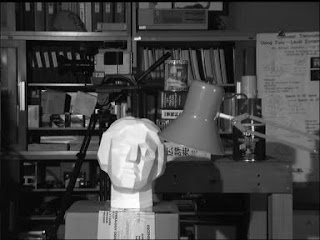
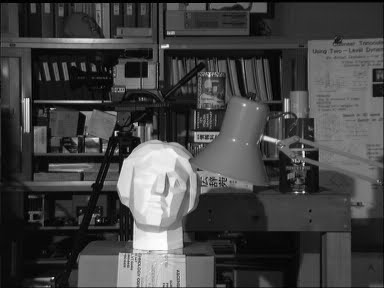
These are the two input image I used to test the program (respectively left and right):

Result using threshold = 100

Result using threshold = 120

Result using threshold = 180

Source: http://glowingpython.blogspot.com/2011/11/computing-disparity-map-in-opencv.html
The stereo pair is represented by two input images, these images are taken with two cameras separated by a distance and the disparity map is derived from the offset of the objects between them. There are various algorithm to compute a disparity map, the one implemented in OpenCV is the graph cut algorithm. To use it we have to call the function CreateStereoGCState() to initialize the data structure needed by the algorithm and use the function FindStereoCorrespondenceGC() to get the disparity map. Let's see the code:
def cut(disparity, image, threshold):
 for i in range(0, image.height):
  for j in range(0, image.width):
   # keep closer object
   if cv.GetReal2D(disparity,i,j) > threshold:
    cv.Set2D(disparity,i,j,cv.Get2D(image,i,j))

# loading the stereo pair
left  = cv.LoadImage('scene_l.bmp',cv.CV_LOAD_IMAGE_GRAYSCALE)
right = cv.LoadImage('scene_r.bmp',cv.CV_LOAD_IMAGE_GRAYSCALE)

disparity_left  = cv.CreateMat(left.height, left.width, cv.CV_16S)
disparity_right = cv.CreateMat(left.height, left.width, cv.CV_16S)

# data structure initialization
state = cv.CreateStereoGCState(16,2)
# running the graph-cut algorithm
cv.FindStereoCorrespondenceGC(left,right,
                          disparity_left,disparity_right,state)

disp_left_visual = cv.CreateMat(left.height, left.width, cv.CV_8U)
cv.ConvertScale( disparity_left, disp_left_visual, -20 );
cv.Save( "disparity.pgm", disp_left_visual ); # save the map

# cutting the object farthest of a threshold (120)
cut(disp_left_visual,left,120)

cv.NamedWindow('Disparity map', cv.CV_WINDOW_AUTOSIZE)
cv.ShowImage('Disparity map', disp_left_visual)
cv.WaitKey()
These are the two input image I used to test the program (respectively left and right):

Result using threshold = 100

Result using threshold = 120

Result using threshold = 180
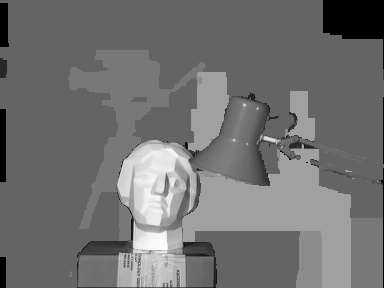
Source: http://glowingpython.blogspot.com/2011/11/computing-disparity-map-in-opencv.html
OpenCV
Computing
Opinions expressed by DZone contributors are their own.
Comments