

Creating an "Body Border" with CSS
By
 ·
·
News
·
·
News
·
Likes
(0)
Likes
There are no likes...yet! 👀
Be the first to like this post!
It looks like you're not logged in.
Sign in to see who liked this post!
Comment
Save
28.8K Views
Join the DZone community and get the full member experience.
Join For Freehicksdesign has been "
fiddling
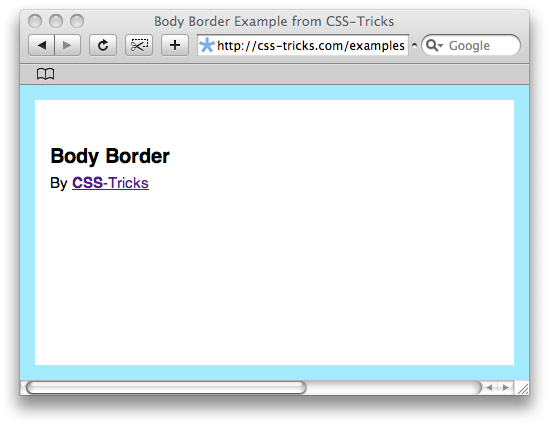
" with their site design. the new design features what someone called in the comments a "body border". it's basically a stroke of color just inside the entire viewable area, all the way around, in the browser window. i thought it was a nice touch and a pretty spiffy little css trick so i thought i'd feature how it was done here.
check out the example page .
four unique page elements are neccecery. div's work fine for this:
here is the css for them. notice how clean the css can be. some properties are shared by all of the elements, some by only the top/bottom and left/right, and some unique to themselves. this css is coded like that, instead of repeating properties and values unnecessarily.
works great in firefox, safari, and opera, and ie 7. does it work in ie 6 (or below)? of course not! mostly has to do with positioning. ie 6 doesn't love fixed positioning and the hacks i find ugly and not terribly reliable. the solution is just to ditch the body border for ie:
header html for conditional stylesheet (put comment tags around this in use):
css to remove body border:
original article here .
check out the example page .
the code
four unique page elements are neccecery. div's work fine for this:
<div id="left"></div>
<div id="right"></div>
<div id="top"></div>
<div id="bottom"></div>
here is the css for them. notice how clean the css can be. some properties are shared by all of the elements, some by only the top/bottom and left/right, and some unique to themselves. this css is coded like that, instead of repeating properties and values unnecessarily.
#top, #bottom, #left, #right {
	background: #a5ebff;
	position: fixed;
	}
	#left, #right {
		top: 0; bottom: 0;
		width: 15px;
		}
		#left { left: 0; }
		#right { right: 0; }

	#top, #bottom {
		left: 0; right: 0;
		height: 15px;
		}
		#top { top: 0; }
		#bottom { bottom: 0; }
browser compatibility
works great in firefox, safari, and opera, and ie 7. does it work in ie 6 (or below)? of course not! mostly has to do with positioning. ie 6 doesn't love fixed positioning and the hacks i find ugly and not terribly reliable. the solution is just to ditch the body border for ie:
header html for conditional stylesheet (put comment tags around this in use):
[if lte ie 6]>
    <link href="/ie6.css" type="text/css" rel="stylesheet" media="screen" />
<![endif]
css to remove body border:
#top, #bottom, #left, #right { display: none; }
original article here .
CSS
Opinions expressed by DZone contributors are their own.
Comments